
Now that we built our IEM rack it was time to bring it to a real life test and measure its latency. Would it really be usable? The short answer is definitely yes! But it certinaly is not free of any latency. We measured a net latency of roughly 2062.500us. Read on if you want to know more.
As a recap, we built a separate IEM rack that only handles the monitor mixes and the personal mixers that create them. The latter is certainly completely optional. Everything could be mixed inside the IEM mixer directly. Therefore our signal chain is probably longer and therefore slower than in less complex environments. Our incoming signals all come in either via Dante or via AES50 into the IEM rack. Inputs are not necessarily wireless, but for our test we used a cheap analogue wireless microphone setup: the Sennheiser ew 100 with the SKP 100 plug-on transmitter.
To get a direct comparison we recorded the wireless signal after it entered our recorder (so actually not being wireless any more) and we did not use a splitter before the transmitter. We then recorded the signal directly into our recorder but in parallel routed the signal via a Main L/R mix back to the recorder and to our FOH mixer, the Behringer Wing, from where we forwarded the signal via AES50 to our IEM rack.
To record the signal that would be audible in the IEM headphones we connected a single channel of the IEM receiver with a mono splitter directly to the same recorder where the original microphone signal entered the system. So, essentially we do not record a LINE signal but a PHONES signal. This is also the reason why the noise floor is higher and the signal is slightly more distorted as we can see from the image below. With this setup we can measure the introduced latency of the whole signal chain except for the latency introduced by the wireless microphone transmitter.
To measure the latency introduced by the wireless IEM transmitter we connected a single channel of the IEM transmitter’s headphone jack directly to the recorder, as well. Presuming both systems, Sennheiser ew 300 IEM and Sennheiser ew 100, are using the same technology – at least they can be used in interchangebly – we can estimate the latency transmission of the wireless microphone transmitter by looking at the latency of the IEM TX/RX pair.
And on the image below you see what is looks like when signing an A' at 440Hz direct and through headphones. Impressive – isn’t it?

Signal Path
Let’s follow the signal path from the source to the recording. The image below shows the signal chain with some operations involved inside the various devices. Further below you find a more thorough description of what is happening.

- Wireless Microphone Transmitter
Sennheiser SKP 100 A1 plug-on transmitter with a Behringer XM8500
I did not really measure the latency of the wireless transmission into the receiver. I could have used a splitter between the mic and the transmitter and have a direct tracking recording from the split signal in parallel with the other tracks. But it was easier to record the signal from the IEM transmitter’s phone jack and presume that the latency of the IEM TX is similar to the latency of the MIC TX. - Wireless Microphone Receiver
Sennheiser EW 100 G4 A1 body pack receiver
Wireless reception of the analogue microphone signal. - LINE IN into a Recorder
Rcording into a Sound Devices Scorpio
The signal is mapped to Channel 1 and directly recorded to the internal SSD of the Scorpio. No additional effects are applied. NoiseSuppression and MixAssist are turned off. Only the limiter is active. The signal is then routed via the Main Bus L/R to Main L/R Out. - LINE IN into Behringer Wing
This setup with the Behringer Wing inbetween is not too realistic, as normally the mic input would run directly into a X32 or Wing (and not divert through the Scorpio). But the Scorpio cannot send signals via AES50 and I did not want to make a DANTE based test.
The signal is directly mapped to the AES50-C output (Mono). No processing on the Wing, no mapping to a Channel. - AES50 downstream into Midas M32C
The Midas M32C is the mixer in the IEM rack
The signal arrives at the AES50-B port on the mixer and is internally routed to the AES50-A port. - AES50 downstream into Midas HUB4
The Midas HUB4 is the distribution to the four Midas DP48 personal mixers
The HUB4 receives 48 independent signals via its AES50-A port that are forwarded to its four AES50 powered outputs. One of them is our wireless microphone. AES50 channels 33 to 48 are in parallel directly output to its physical XLR/TRS balanced outputs and are not meant to be used by the personal mixers. The option “PORT 1-4 AES50-A 1-32” is turned on. Options “1” to “4” are turned off. - AES50 upstream into Midas DP48
Midas DP48 is the personal mixer that allows to create two stereo mixes per device
Both pairs of resulting mixes are sent back to the HUB4 as AES50 channels 1,2 and 5,6. Additionally, channel 3,4 and 7,8 separately transport the builtin microphones and the aux ins. Talkback is routed on channel 48. - AES50 upstream back into Midas HUB4
Per single DP48 eight AES50 channels enter the HUB4
HUB4 does not route the A and B stereo mixes of the DP48 to its physical output ports, but upstreams them directly to the M32C. Talkback channel 48 is forwareded as well, but also downstreamed back into the DP48 ports. - AES50 upstream back into Midas M32C
The M32C re-mixes the respective A/B DP48 stereo mixes
The reason here is, that additional signals such as talkback from FOH or click tracks could be added here. Furthermore to support Stereo, Mono und Focus mode on the IEM transmitter, the mixes can be changed from either input to either IEM transmitter. That means, that every signal of every stereo mix is mapped to its own input channel. From there, these channels are routed to a mix bus and subsequently mapped to an output. Talkback channel 48 from downstream is not added to the mixes. The mixes are then internally routed to AES50 channels 33-40. - AES50 downstream back into Midas HUB4
Another time into HUB4
With the option “PORT 1-4 AES50-A 1-32” enabled channels 33-48 are routed to the physical outputs on the back of the HUB4. The reason why we do this: M32C does not have any physical outputs on its own and we wanted to reduce space from 3U to 1U when we changed from the X32. Only the first eight channels are used and connected to four IEM stereo transmitters. By this we also use only one eight channel bank on the M32C. - LINE IN into IEM Transmitter
Sennheiser ew IEM A1 Transmitter
The IEM transmitters can operate in either of three modes: Mono, Stereo, Focus. Effecively, both input channels are transmitted wirelessly to their respective receivers. In Focus mode L is transmitted as a single channel to a single receiver and R is transmitted as a single channel to the other receiver. - Wireless IEM Receiver
Sennheiser ew IEM A1 Receiver
The resulting mix from a DP48 is finally received on the wireless IEM receiver and output on its Phones port. In reality this would be the end of the signal chain. Ok – more prcecisely: the end of the signal chain would be the ear of the talent receiving the mix.
In our test setup the stereo signal of the Phones connector is split into two Mono channels and one of them is fed into the Scorpio recorder. - LINE IN into a Recorder
Rcording into a Sound Devices Scorpio
The Mono signal of the IEM receiver is mapped to Channel 2 and directly recorded to the internal SSD of the Scorpio. No additional effects are applied. NoiseSuppression and MixAssist are turned off. Only the limiter is active.
Observations
From our previous tests with the S32, SD16 and DN4816-O stage box, we know that a change of the AES50 bus can take around 22 samples which equates to roughly 458.333us. Doing this a couple of times does build up some latency.
When I did my first test with Cedar SDNX NoiseSuppression turned on on the Scorpio (a leftover from some previous recording), I noticed a much higher latency (over an additional 2000us more). I certainly repeated the test with a that feature turned off. But it proves the point, that “effect processing” and the mixers themselves introduce additional latency of their own.
From the recording we can determine the latency that is introduced from the entrance of the microphone signal from the wireless microphone transmitter into the recorder and the exit of the mixed signal from the wireless IEM receiver into the recorder.
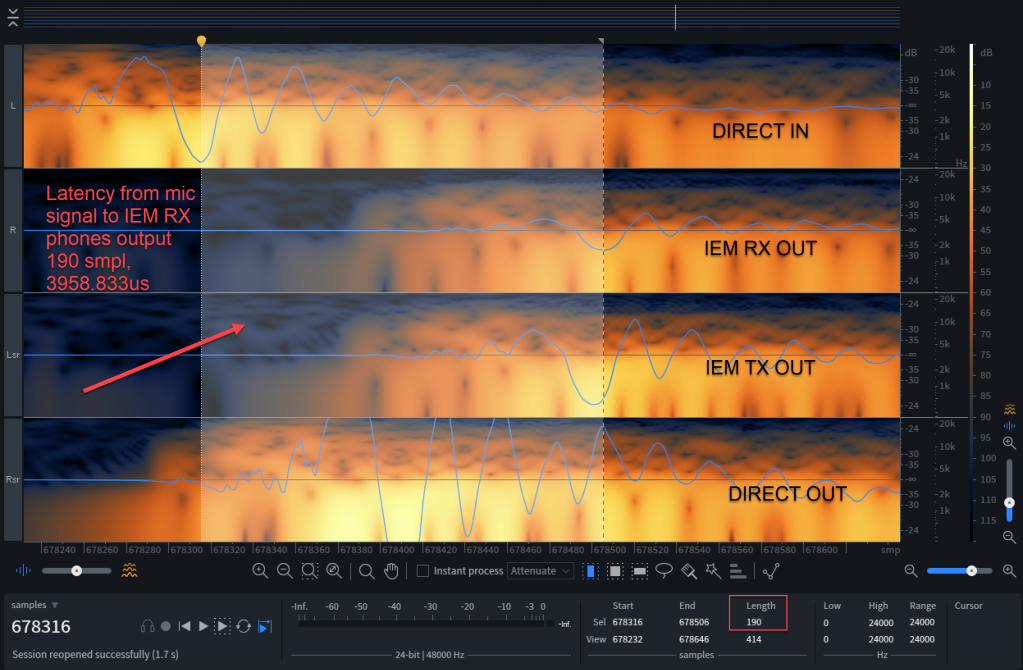
Though the noise floor of the lower signal is considerably higher, we can find that the latency is 190 samples. As we are running at 48'000Hz each sample takes roughly 20.833us (micro seconds). From there we can calculate the total latency of 190 * 20.833us = 3958.833us.
Again: this excludes the latency that is introduced from the transmission of the wireless microphone itself, but this still includes the latency introduced by the Scorpio recorder iteself.
From the image below we can determine the latency of the Scorpio recorder, which is 97 * 20.833us = 2020.833us.
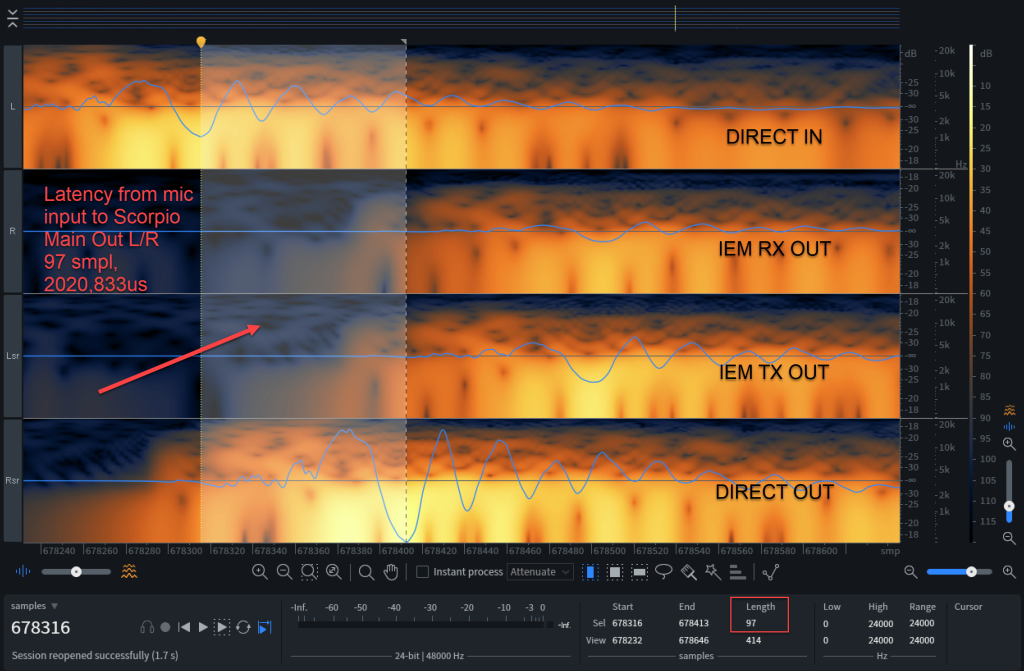
Asking Sennheiser about the latency of their ew 100 and ew 300 G4 series, I got the answer “practically no latency”. This proves to be correct when we look at the image below where we see the latency from the IEM TX headphones out and the IEM RX headphones out signal: 5 * 20.833us = 104.167us.

So, when we measure the latency of the signal from exiting the Scorpio to the IEM RX headphones out, we see 94 * 20.833us = 1958.833us. If the ew 100 G4 microphone transmitter is as fsat as the ew 300 IEM TX we should add anther 5 samples for the microphone transmission, so we end up with a total latency of (94 + 5 = 99) * 20.833us = 2062.500us.

Conclusion
As mentioned before, I do not expect the wireless microphones to enter through the Scorpio and only then enter the main mixer. And even if we did that, I would end up with a total latency of 194 * 20.833us = 4041.667us – which is still very much acceptable.
So, all in all: our IEM rack is fast enough to be used with wireless IEM for instruments and vocals while being flexible enough to support extensive routing and personal mixing.
Addendum
If you are interested in the latency of the Behringer X32 Rack and the Behringer P16-M there are two interesting articles in German here:
Corrigendum
./.
 appclusive
One thought on “Latency Test with a Wireless Microphone, through a DP48 Personal Mixer and a Wireless IEM”